Facebook to use Face Recognition to Tag Photos

Face Recognition technology developed in-house to group similar faces together and make tagging simpler.
Facebook proudly boasts of getting millions of photos uploaded per day compared to photo-upload and sharing service - Flickr. After uploading hundreds of photos, it becomes difficult to tag all your friends. To make that task easier, Facebook has announced new Tag Suggestions feature that automatically suggests who (out of your contacts) should be tagged in the photo from a group of similar photos.
This feature makes use of Face Recognition technology to group similar looking faces together. Facebook would be rolling out this feature for US region by next week.
Popular social network Facebook is one of the most favorite hangout for youngsters and an online junction to connect for many. As of now, tagging multiple photos can be a time consuming task.
With the new Tag Suggestions feature, thanks to Facebook's Face Recognition technology developed in-house, it will automatically show similar photos to be tagged, as soon as you upload a new batch. This is how it is supposed to work.
With the new Tag Suggestions feature, thanks to Facebook's Face Recognition technology developed in-house, it will automatically show similar photos to be tagged, as soon as you upload a new batch. This is how it is supposed to work.
Suppose you upload photos of your recent college reunion on Facebook. When you wish to tag them, Facebook will groups similar faces together from the photos uploaded and show them with 'Who is this?' suggestion.
Tag :
Facebook,
Site Tricks
Accelerate your Game Performance with Futuremark 3DMark 11

Your PC s performance is determined by the interactions between different hardware components, the operating system and the type and amount of software running. A benchmark provides a set of performance tests that can be repeated with a high degree of accuracy on a wide range of computer hardware.
3DMark 11 is the latest version of the world s most popular benchmark for measuring the graphics performance of gaming PCs. Designed for testing DirectX 11 hardware running on Windows 7 and Windows Vista the benchmark includes six all new benchmark tests that make extensive use of all the new features in DirectX 11 including tessellation, compute shaders and multi-threading.
Tag :
Comp Tricks
How to create a simple fake virus for windows by using the nircmd utility.

Have you ever dreamed of creating a fake virus yourself to play a prank by installing the virus on your friend computer and a making a fool of him. If Yes then this post is of great interest to you.
So what would you like to do with a virus to make your friend believe that a virus has infected his/her computer.
Hmm….let me guess?
1. Suddenly Opening and closing of cd drive.
2. Power off the monitor.
3. Log out the user out of windows xp.
4. Turn off the computer.
5. And much more….well actually any of the above events combination can make any windows user thinks that his/her system is infected.
Tag :
Virus Tricks
Think twice before you post anything on social networking sites.

Social networking sites allow you to express yourself and keep in touch with friends by exchanging messages or comments and posting personal profiles describing who you are and your interests, blogs or online diaries, photos, creative writing, artwork, videos, and music. Instant Messaging (IM) and sharing online profiles are popular forms of social networking.
If practiced safely, there can be many positive aspects of social networking. You can connect with friends and seek like-minded individuals. However, you should understand how posting too much information on your profile and communicating with people you’ve only met online can put you in potential danger.
BEWARE!
DID YOU KNOW???
Some sites and services ask you to post a “profile” with your age, sex, hobbies, and interests. While these profiles help you connect and share common interests, potential exploiters can and do use these profiles to search for victims.
Users may pose as someone else — a different person or a person of a different age — without others knowing. Such users have taken advantage of this and this aspect of social-networking profiles to entice or sexually exploit teens.
You can’t “take back” the online text and images you’ve entered. Once online, “chat” as well as other web postings become public information. Many web sites are “cached” by search engines, and photos and text can be retrieved long after the site has been deleted.
Teens have been punished by their families; denied entry into schools; and even not hired because of dangerous, demeaning, or harmful information found on their personal sites or blogs.
Tag :
Site Tricks
Facebook, Twitter, WordPress Fail Security Report.

Facebook, Twitter, and WordPress have failed a security exam conducted by "security think tank" Digital Society, highlighting old vulnerabilities most recently displayed by the spread of Firesheep.
Gmail and WordPress, which use an encryption and identification process known as SSL, received A's. Google scored a C, Yahoo and Amazon received a C-, and Hotmail and Flickr received a D-.
The main reason Twitter and Facebook failed is because neither uses complete SSL authentication, according to the report. In other words, a user can't know for sure if the authentication page they think they're visiting is actually HTTP. WordPress without SSL, the free version commonly used by personal bloggers, also lacked SSL authentication for logins.
A Facebook spokesman said the company has "been making progress testing SSL access across Facebook and hope to provide it as an option in the coming months."
Tag :
Site Tricks
5 Useful Applications For A USB Drive
We all love our USB drives, don’t we? You should probably be using someportable apps on your USB drive.
In this post, I want to cover a few apps that will make managing your USB drive easier. In essence I’ll talk about tools that can be used to make things easier if you’ve got a USB drive – not about apps that work from your drive.
So here we go - five applications to make things easier if you’re using a USB thumb drive.

1) Prevent Virus Infections on your USB Thumb Drive with ThumbScrew
If you’re working on a system that’s probably infected with viruses, you wouldn’t want to see your USB thumb drive get infected by the same – they probably have some backups of your data that you cannot afford to lose. However, if you’re in an inevitable situation where you really have to access the USB drive do so after you install ThumbScrew.
ThumbScrew can be used to write-protect your USB drive so that malware from your computer doesn’t spread to it. Download and launch the app, right click the System Tray icon and choose ‘Make USB Read Only’. Nothing could be written to the USB Drive, you’re completely protected from infections spreading to your disk from your computer.
2) Eject USB Devices Quickly with USB Disk Eject
Windows does give you options to eject your USB drives – we all use that by clicking on the ‘Safely Remove Hardware’ option in the System Tray. But have you ever thought it’s too cumbersome and the list confuses you more than helps you remove thatparticular device?
People who’ve got multiple USB Devices connected to their system will have really felt this annoyance as the hardware remove dialog doesn’t make it clear which option removes what device.
Here’s the solution: Download this tiny but functional app called USB Disk Eject. Just double-click when you need to remove a USB drive and a window will pop up listingthe devices connected to your system via USB. Each device is labelled clearly and legibly. Just double-click on the one that you want to get removed and you’re done.
Tag :
Comp Tricks,
Virus Tricks
How to use your Gmail space as your hard disk
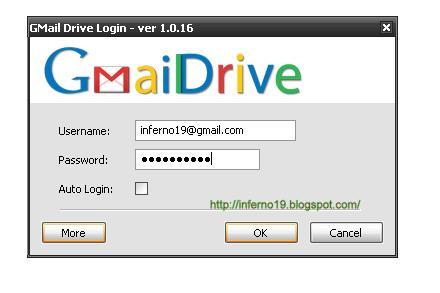
If you are having extra space on your Gmail account and you are running out of space on your hard disk. Then you can use that free Gmail space as a hard drive. Using a cool freeware program called Gdrive will create an extra drive inside My Computer and every time you use this drive i.e. use files from it, is actually downloading and uploading to your Gmail account.
1> First download Gmail Drive
2> Extract the files from the downloaded file and click Setup.
Tag :
Site Tricks